|
◆ The Take ◆
|
|
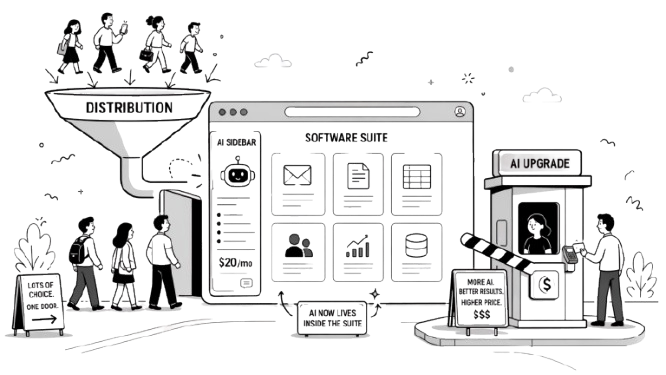
For a while, the AI bull case for incumbents looked simple: they already owned distribution. Control email, documents, CRM, or the data layer underneath them, and AI is an easy add-on. Ship a copilot, bundle it into the suite, win by default... they thought.
Then Anthropic shipped Claude directly into Word, Excel, and PowerPoint as a sidebar. A standalone model, competing inside the product Microsoft was supposed to own. And Microsoft had to add Claude as a subprocessor inside Copilot anyway, because it's better at certain tasks. The company that bet $13 billion on owning the AI layer is now routing a competitor's model through its own product.
Google and Adobe made similar moves this week. The pattern is the same everywhere: every major SaaS vendor is positioning itself as the AI layer for your data.
But the moat has shifted. Vendors can no longer guarantee they're the only AI inside their own products. Model quality moves too fast. Buyers are comparing bundled AI against standalone AI. And "AI inside the suite" is starting to look less like a product advantage and more like a monetization strategy.
Read the fine print and you'll see it. Google's Workspace Intelligence requires specific tiers. Adobe's new AI agent ships on enterprise plans. The AI is real. It's also behind a plan upgrade.
Buyers hear "your existing stack is becoming AI-capable" and assume the decision is getting easier. It's getting more expensive. The AI layer gets pushed behind a pricier plan, with more vendor dependency, and with unclear value relative to a $20/month standalone subscription.
Every vendor has AI now. The question worth asking: what are you actually paying for, and could a $20/month standalone subscription do the same thing?
Distribution used to be the moat. Now it's the funnel. And the real tollbooth is the upgrade path.
|
|
|
◆ The Signal ◆
|
Google Workspace Intelligence Is Live: AI Now Reads Across Your Gmail, Docs, Sheets, Calendar, and Chat
What happened. Google launched Workspace Intelligence at Cloud Next, available to Workspace users on eligible Gemini add-on plans. It creates a shared context layer across Gmail, Docs, Sheets, Calendar, Chat, and Drive so the AI pulls context from everything at once. The headline feature: ask Gemini in Chat "what are my top 5 priorities today?" and get answers drawn from your full Workspace.
The reality. This is Google's answer to Microsoft Copilot for M365. Google has been layering AI into Workspace for over a year but most often slowly and in random bits at a time. Workspace Intelligence is the unified branding for those capabilities, now with better cross-app synthesis. Early reports say it works best with well-organized data. Messy inboxes produce messy answers... who would have guessed?
→ Your move. Open Gemini in your Google Chat and ask "what are my priorities this week?" See whether the answer is useful or noise. |
|
ChatGPT's Image Generator Just Got a Lot Better
What happened. OpenAI released gpt-image-2 on April 21, the model now powering ChatGPT's image generation. The meaningful change isn't just quality... it's also the approach. When you select a "Thinking" model in ChatGPT, the system no longer just draws. It reasons through structure, composition, and intent before generating anything. Text rendering inside images is significantly more accurate too. The model is live in ChatGPT now and I was rather impressed with the tests I ran.
The reality. This is a genuine step up from the previous version, particularly for images that need accurate text, logos, or specific visual structure. The "war" between image models seems ongoing between Google (with "Nano Banana") and now OpenAI... with Anthropic sitting this one out.
→ Your move. Open ChatGPT and try generating a visual you'd normally brief a designer on — a social post, a slide header, a mock ad. See whether it holds up for your actual use case before assuming it will or won't work for your team. |
|
A February Court Ruling on AI Chat Privilege Is Now Reshaping Legal Guidance
What happened. In February, a federal judge ruled that a CEO facing federal fraud charges couldn't shield his conversations with Claude (Anthropic's AI chatbot) under attorney-client privilege, because AI tools aren't lawyers. The ruling in United States v. Heppner is now driving updated guidance from law firms and compliance teams. Anything typed into ChatGPT, Claude, or similar tools could be subpoenaed by prosecutors or opposing counsel.
The reality. It's one ruling in a criminal fraud case, not settled law. But the legal logic (AI isn't a lawyer, so privilege doesn't apply) is straightforward and likely to hold. The practical risk is real right now.
→ Your move. Have a conversation with your team about what's appropriate to type into AI tools, especially anything involving litigation, negotiations, or sensitive client matters. |
|
|
|
◆ Also on the Radar ◆
|
| ◆ | Adobe launched CX Enterprise, combining AI agents (software that acts on your behalf) to manage the full customer lifecycle from acquisition through loyalty. (PYMNTS) |
| | ◆ | Sundar Pichai at Cloud Next: 75% of all new code at Google is now AI-generated and engineer-approved, up from 50% six months ago. AI seems to continue to dominate in coding contexts. (Google Blog) |
| | ◆ | Colorado's AI Act enforcement starts June 30, but a lighter replacement framework is being drafted simultaneously. Two deadlines now in play. (DCI Consulting) |
| | ◆ | EY is building AI agents into its audit workflow, automating chunks of the process that used to be junior associate hours. Big consulting firms are trying to catch up fast and not let technology companies eat their lunch
(EY)
- Novo Nordisk partnered with OpenAI to embed AI across its entire business, from drug discovery to supply chain, with full deployment targeted by end of 2026. Very interesting to see "traditional companies" apply AI beyond just-yet-another-web-app. (Crescendo AI News) |
|
|
|
◆ Reality Check ◆
|
|
Everyone's saying AI models can help you think through business strategy. Researchers tested that claim across 30,000 queries.
The study fed major models (GPT-5, Claude, and others) business strategy questions spanning different industries, company sizes, and competitive contexts. The result: models consistently recommended the same generic advice regardless of specifics. Researchers called it "trendslop," a term for confident-sounding strategic guidance that ignores the actual situation. Ask about a 5-person agency's pricing strategy or a 500-person manufacturer's market entry and you get structurally identical answers.
The cause is predictable. Models are trained on internet text, which skews toward popular business advice (think Harvard Business Review summaries, LinkedIn posts, startup playbooks). The output reflects the average of that training data. When every model has read the same strategy content, every model gives the same strategy back.
This matters for anyone using AI as a sounding board for business decisions. The output sounds authoritative. It uses the right vocabulary. It structures arguments cleanly (and convincingly). But it's pattern-matching on what "good strategy advice" looks like online, not reasoning about your specific constraints. That said, two questions are still relevant: (a) how "unique" is your problem, really? (b) will this get better?
What we still don't knowWhether better prompting (providing detailed context, financials, competitive specifics) meaningfully improves the advice quality, or whether the generic tendency is baked into training. Early evidence suggests more context helps at the margins but doesn't fix the core problem.
Source: Harvard Business Review
|
|
|
◆ Tool of the Day ◆
|
Napkin AI
|
|
| Use this when You need to turn a written concept into a visual for a client deck, a LinkedIn post, or internal documentation, and you don't want to spend 40 minutes in a design tool building it from scratch. | Why this one Canva starts from a blank canvas; you're the designer. Napkin starts from your text; it does the layout, structure, and visual logic for you. The output sits alongside your text in a document-style editor — highlight a paragraph, click once, pick from several generated options. | Watch out for It handles structured text well (lists, frameworks, processes). Vague or abstract writing produces weaker results. Also: PPTX and SVG export require the paid tier, so free users are limited to PNG and PDF. | Price Free (500 credits/week, Napkin watermark on exports). Plus at $9/month removes watermarks and unlocks PPT export. napkin.ai | Source |
|
|
|
◆ Workflow Unlock ◆
|
For: Any client-facing professional (consultants, agency account managers, sales leads) To: Build a sourced pre-meeting brief in under 5 minutes using three sequential prompts | 1 | Open Perplexity (free) or ChatGPT with browsing. Paste:
Prompt I'm meeting with [Name, Title] at [Company] in [timeframe]. Give me a 3-paragraph company overview: what they do, their market position, and their most recent strategic moves. Cite sources. |
| | 2 | Follow up with:
Prompt Based on that overview, what are the 3 most likely priorities or pain points for someone in [their role] right now? What questions would they expect me to already know the answer to? |
| | 3 | Final prompt:
Prompt Give me a one-page pre-meeting brief: company snapshot (2 lines), their likely priorities (bullet list), recent news I should reference (with dates), and 2 smart questions I can ask that show I've done my homework. |
|
Watch out for: Sequential prompting works because each step builds context. Asking all three at once produces generic slop. Verify claims before citing them in the meeting.
|
|
◆ The Wow ◆
|
|
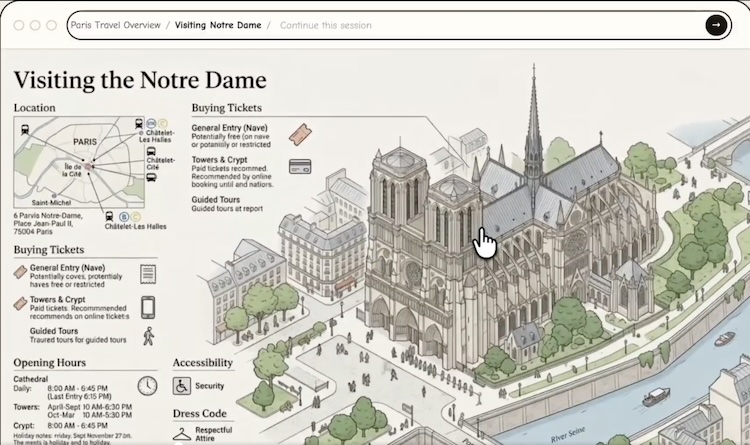
Every pixel on screen, streamed live from an AI model. No HTML. No code. No layout engine.
A team of three built a prototype where the entire screen is AI-generated imagery you can "navigate" through. Any region is interactive. Illustrations reshape to fit your window. They demoed a coding interface rendered entirely this way. It's early and slow. But if models get accurate (and fast) enough, the way we experience the web and learn topics could dramatically change. Source: Zain Shah (@zan2434)
|
|
◆ Further Reading ◆
|
| "Stanford's 2026 AI Index: The Charts That Explain Where AI Actually Stands" (MIT Technology Review) — The most credible annual AI report card. Adoption is outpacing PCs and the internet. | | "Managers and Executives Disagree on AI — And It's Costing Companies" (Harvard Business Review) — Wharton researchers pinpoint the gap between executives setting AI strategy and managers facing reality. (May be paywalled.) | | "An Agency Owner's Account of Rebuilding Workflows Three Times" (upGrowth Digital) — A 32-person agency's own post-mortem on what actually changed. Clients expecting lower prices left. | | "Agentic AI, Explained" (MIT Sloan) — The cleanest non-technical explainer. The link to send when a client asks. |
|
|